Getting Started with Emajon on iPhone
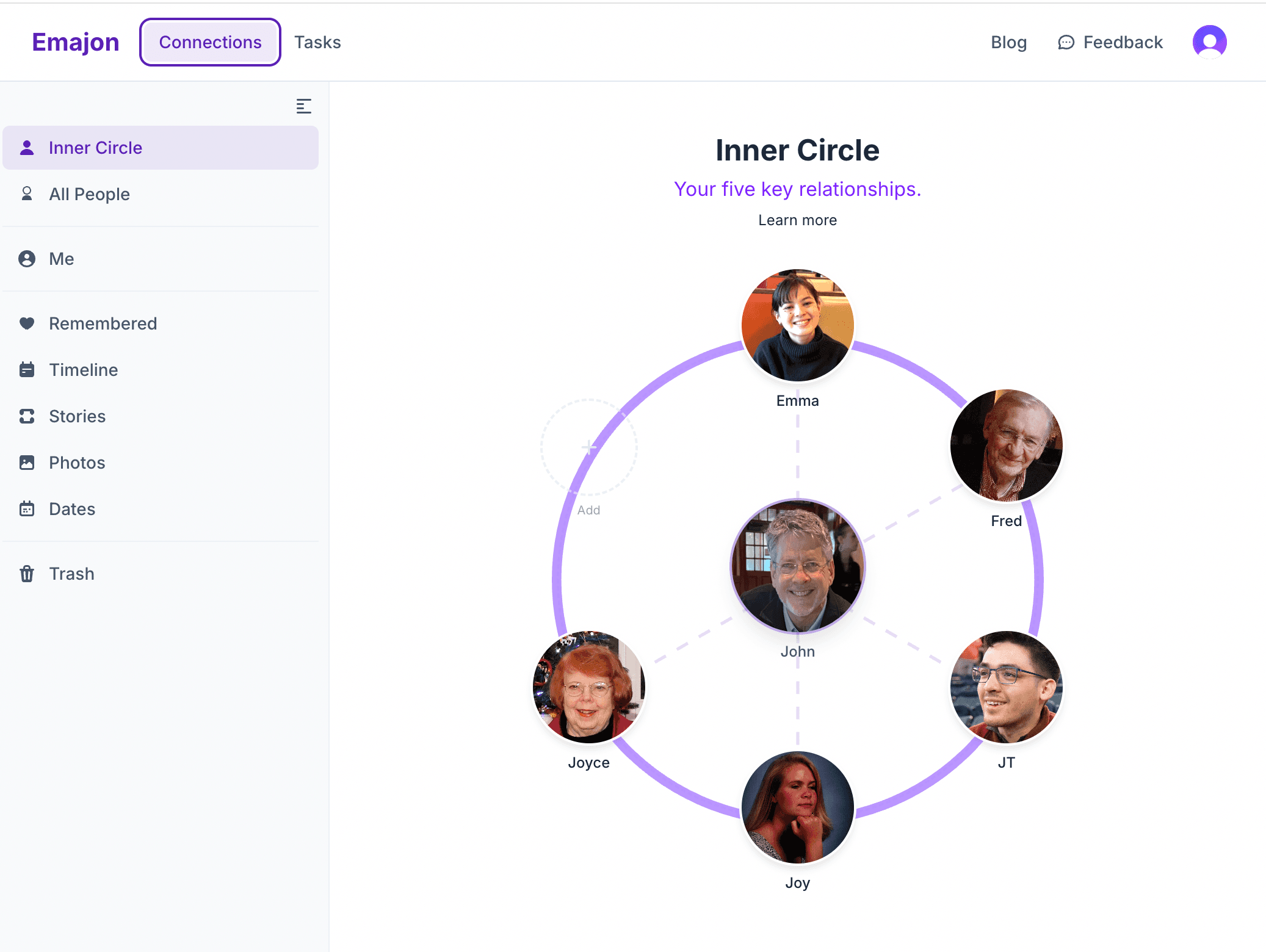
You just downloaded Emajon. Maybe you're staring at it wondering where to start. That's normal. Let's walk through this together — no rush, no pressure, no "complete your profile to unlock features" nonsense.
The whole point of Emajon is to help you stay close to the people who matter. So let's start there — with one person.
Step 1: Think of One Person
Not your entire contact list. Not "everyone I should stay in touch with." Just one.
Who comes to mind when you think: I wish I was better at keeping up with them?
Maybe it's the friend who always reaches out first. The cousin you keep meaning to call. The person you think about at random moments but never quite turn that thought into a text.
That's your person. Hold onto that name.
What to do: Tap Connections at the bottom, then tap the + button. Type their name — just a first name is fine. That's it. You've started.
Step 2: Add One Thing You Know About Them
You don't need to fill out a full profile. You don't need their birthday, their address, their blood type. Just one thing that makes them them in your mind.
Maybe it's:
- "Just started a new job at the hospital"
- "Loves hiking — always posting trail photos"
- "Going through a hard time with their mom"
Tap into their profile and add a story or a detail. One sentence is plenty. You're not building a dossier — you're leaving a breadcrumb for your future self.
Why this matters: Next time Emajon gently reminds you about this person, you won't just see a name. You'll see context. And context is what turns "I should reach out" into "Hey, how's the new job going?"
Step 3: Add Two More People
Research on close relationships (from Robin Dunbar's work, which Emajon is built around) shows that humans can maintain about five truly intimate relationships at any time. Not fifty. Not five hundred. Five.
So let's not overwhelm ourselves. Add two more people — the ones who'd be in your "inner circle" if you had to pick right now. The people who matter most.
What to do: Same as before. Name + one thing you know about them. Three people, three minutes.
You now have the beginning of your inner circle.
Step 4: Let Emajon Work For You
Here's where things start to click. Go back to your Home tab. Over time, you'll start seeing:
- Connection nudges — gentle reminders when someone's been quiet for a while. No guilt, no scores. Just a soft "Hey, you haven't connected with Sarah in a bit. Here's what you last talked about."
- Important dates — birthdays and anniversaries surfaced a few days early, so you actually have time to do something about it.
- Conversation bridges — when Emajon nudges you about someone, it includes context from your stories and details so you know exactly what to say.
You don't have to check the app every day. It works in the background, building up a quiet awareness of your relationships that your brain can lean on.
Step 5: Capture Things as They Happen
The most powerful habit in Emajon isn't filling out profiles. It's capturing moments in real time.
After a phone call: "She told me about the house offer — waiting to hear back Friday."
After a text thread: "He's excited about the concert in April."
After running into someone: "Bumped into them at the store. Their kid is starting soccer."
Tap the person, add a quick story. Ten seconds. That's it.
Why this works psychologically: Your brain is terrible at remembering these details later (especially with ADHD). But it's great at noticing them in the moment. Emajon just gives you somewhere to put them before they evaporate.
Step 6: Expand When It Feels Natural
Once your inner circle feels solid, you might want to add more people:
- Close friends who aren't quite inner circle but matter a lot
- Family members you want to stay connected with
- Meaningful acquaintances — the neighbor who checks on you, the coworker you actually like
Each person you add gets the same simple treatment: a name, a detail or two, and Emajon handles the rest.
You can organize people into tiers (inner circle, close, friend, acquaintance) and groups (family, work, college friends). But none of that is required. Start messy. Organize later — or don't.
Step 7: Explore the Rest
Once you're comfortable with the basics, there's more to discover:
- Journal — a private space for reflection. Quick entries, mood tracking, and prompts designed for ADHD brains. Find it in the More tab.
- Planner — capture tasks, reminders, and to-dos. Quick capture means you can dump something out of your head in seconds.
- Photos — attach photos to people, not just to your camera roll. That selfie with your college roommate? It belongs on their profile.
- Personas — different "cards" you share with different people. Your work contacts see your professional info; your friends see the real you. Tap your profile photo in the top right to set these up.
- Discover — articles and tips about maintaining connections, managing energy, and understanding how your brain works. Check the More tab.
The Philosophy
Emajon will never guilt you. There are no streaks, no scores, no "you haven't opened the app in 5 days!" notifications.
Your relationship with this app will be inconsistent — bursts of activity, then quiet stretches. That's fine. That's human. When you come back, everything will be right where you left it, and the app will gently surface what matters most right now.
The only metric that matters is this: are you reaching out to the people you care about slightly more often than you would without help?
If the answer is yes — even once a month — Emajon is doing its job.
Quick Reference: Where Things Live
| What you want | Where to find it | |---|---| | Add someone | Connections tab → + button | | See who needs attention | Home tab (connection nudges) | | Add a story or detail | Tap a person → Timeline or Details tab | | Set up your profile | Tap your photo (top right) | | Write a journal entry | More → Journal | | Capture a task | Home → type in the capture bar | | App settings | More → Settings | | Find articles & tips | More → Discover |
Start Small
You don't have to use everything today. You don't have to use everything ever. Start with one person, one detail, one moment captured. The rest will come.
And if you're reading this thinking "I already know who I want to reach out to" — go do that first. The app will be here when you get back.
Related Articles
Getting Started with Emajon
What Emajon is, why it exists, and how to make it yours — a quick guide for new users.
Your Five Key Relationships
How to use the Inner Circle in Emajon — adding people, enriching profiles, and the gentle nudges that help you stay connected.

Introducing Reconnect '26
Everyone has people who matter. Reconnect '26 is a practice — not a challenge — for closing the gap between how much you care and how often you connect.